
API Tokens
Create and manage API tokens to call AI Router with one OpenAI-compatible key and base URL.
API tokens are the credentials your applications use to call AI Router. Each token is a single key that works against one OpenAI-compatible base URL, so you can route to many model providers without juggling per-provider keys. On this page you can view, create, edit, and revoke your tokens.
View tokens
The token list shows every key on your account along with its name, status, group, quota, and usage. Use it to monitor consumption, disable a leaked key, or copy a key into a new integration.
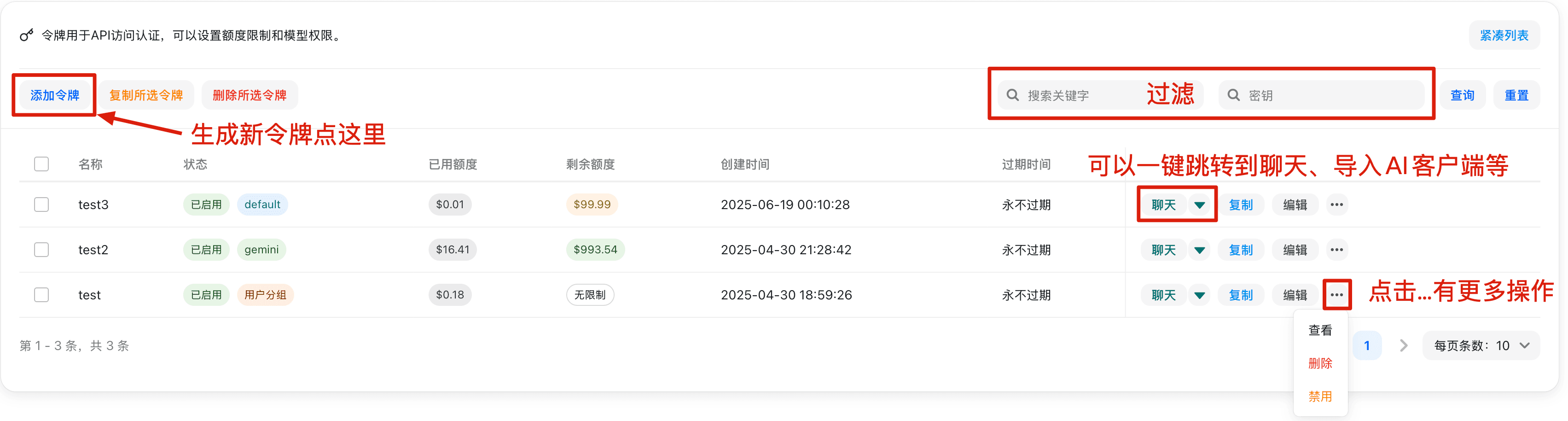
A token's secret is shown in full only once, at creation time. Copy it immediately and store it somewhere secure (for example a secret manager or your deployment's environment variables). If a token is lost or exposed, revoke it and create a new one.
Add a token
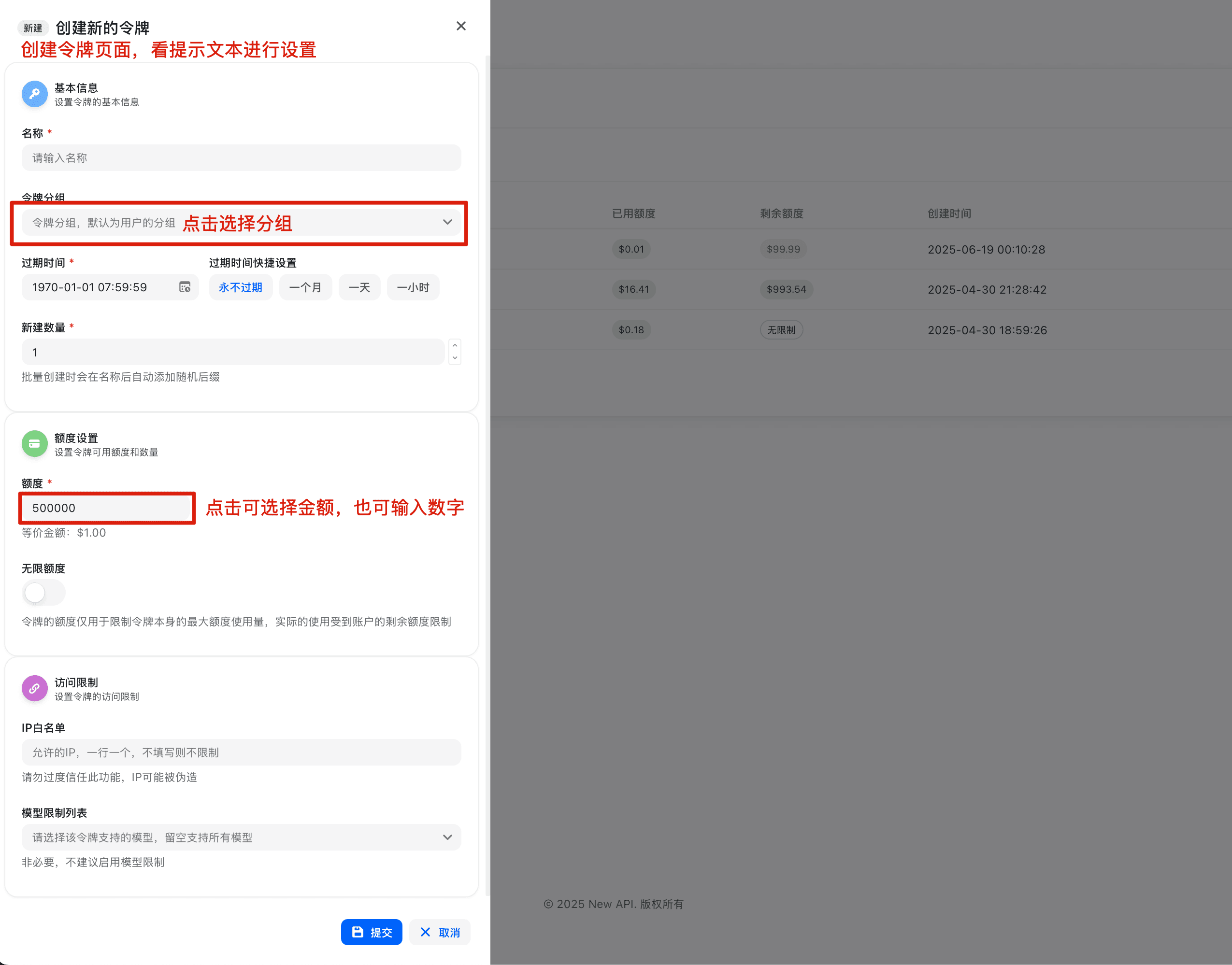
Name the token. Give it a description that identifies where it will be used (for example prod-backend or local-dev) so it is easy to recognize and revoke later.
Choose a token group (optional). Token groups control which model groups and routing rules a key may use. If your account has groups configured, pick the one that matches the intended workload; otherwise the default group applies.
Set a quota (optional). You can cap how much a single token may consume, or leave it unlimited. This is useful for sharing a key with a limited budget. (Quota units and pricing are configured by the administrator — TBD for this demo.)
Set an expiry (optional). Choose a date after which the token stops working, or leave it as never-expiring.
Create and copy. Save the token, then copy the generated secret right away — it will not be shown again.
Using a token
AI Router exposes an OpenAI-compatible API, so any OpenAI SDK or HTTP client works once you point it at the AI Router base URL and pass your token as a Bearer credential.
- Base URL:
https://ai.sammier.com - OpenAI-compatible endpoint:
https://ai.sammier.com/v1 - Authentication:
Authorization: Bearer <your-token>
Example request:
curl https://ai.sammier.com/v1/chat/completions \
  -H "Authorization: Bearer $CODE_ROUTER_TOKEN" \
  -H "Content-Type: application/json" \
  -d '{
    "model": "<model-or-model-group>",
    "messages": [{"role": "user", "content": "Hello"}]
  }'
Using the official OpenAI SDKs, set the base URL and API key instead of the OpenAI defaults:
from openai import OpenAI

client = OpenAI(
    base_url="https://ai.sammier.com/v1",
    api_key="<your-token>",
)
Prefer reading the token from an environment variable (for example CODE_ROUTER_TOKEN) rather than hard-coding it in source. The model field accepts a model name or a configured model group; available models depend on what the administrator has enabled for your token group.
Managing tokens
- Disable / enable: Temporarily turn a token off without deleting it — handy if you suspect it leaked but want to keep its history.
- Edit: Update the name, group, quota, or expiry. The secret itself cannot be re-displayed; rotate the token if you need a new secret.
- Delete: Permanently revoke a token. Any application still using it will start receiving authentication errors.
Troubleshooting
| Symptom | Likely cause |
|---|---|
401 Unauthorized | Token is wrong, disabled, expired, or missing the Bearer prefix. |
403 / model not allowed | The model is not enabled for this token's group. |
| Quota / insufficient balance error | The token's quota or the account balance is exhausted (limits are admin-configured — TBD for this demo). |
| Connection error | Wrong base URL — confirm you are using https://ai.sammier.com/v1. |
Found a problem with the docs or the gateway? Open an issue on the source repository at github.com/ssgzy/Router-new-api.
How is this guide?
Last updated on